响应事件
本节内容可以参考CaseStudy目录下的文件"地图.Table"的示例七。
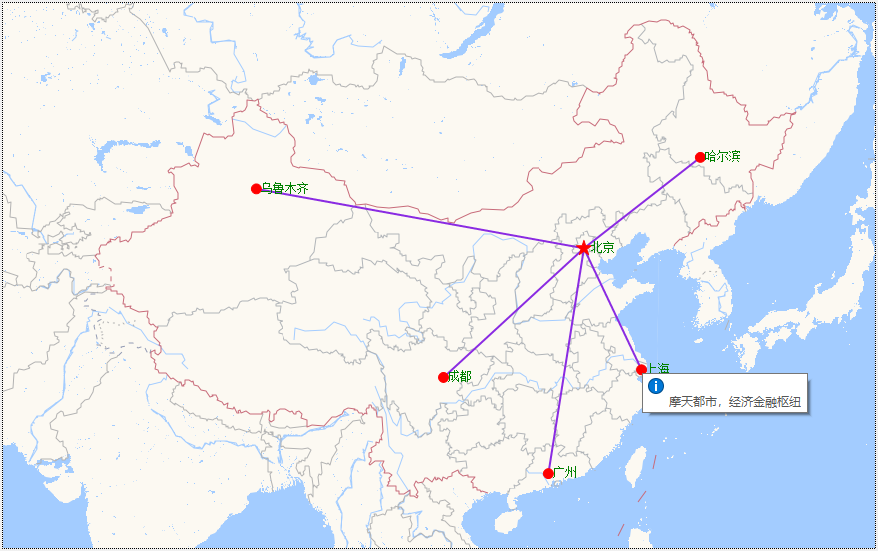
本节的任务是将鼠标移到某个城市(或线条)时,能显示提示信息:
Map控件中所有的形状(包括标记、线条和多边形)都可以响应鼠标事件,可响应的鼠标事件有MouseClick、DoubleClick、MouseMove、MouseDown、MouseUp。
形状本身并没有事件,控件才有事件,那么形状是如何触发执行事件的呢?
基本的思路是:
1、在添加形状的时候,给形状的Tag属性设置一个值,用于唯一识别形状和(或)附属数据。
2、在控件的鼠标事件中,用map的HitTest方法获得鼠标位置的形状,然后通过判断其tag属性值执行后续操作,基本代码为:
Dim
map
As
GeoMap = e.Form.Controls("Map1").GeoMap
Dim
tag
As
String
=
""
Dim
ifo
As
HitTestInfo = map.HitTest(e.Sender.MousePosition)
'MousePosition为新增加的通用属性,用于返回鼠标位置。
If
ifo
IsNot
Nothing
AndAlso
ifo.Vector
IsNot
Nothing
Then
'如果是形状
tag = ifo.Vector.Tag.ToString()
'获得形状的tag属性值
End
If
'后续代码
提示:
以前只有MouseMove、MouseDown、MouseUp事件能获得鼠标位置(通过e.X和e.Y属性),Foxtable 2026给所有控件增加了一个MousePosition,用于返回时事件触发时的鼠标位置(Point类型),使用起来更加方便 。
HitTest方法返回的类型为HitTestInfo,该类型的属性有:
| 属性 | 说明 |
| Vector | 返回触发事件的形状 |
| Layer | 返回形状所属的矢量层或地图层 |
示例
1、将Map控件的"地图来源"属性设置为"Custom"
2、将Map控件的GetMapTile事件代码设置为:
Dim
style
As
Integer
= 8
'地图类型,可选值为6到10,其中6为卫星图
Dim
size
As
Integer
= 1
Dim
scale
As
Integer
= 1
Dim
server
As
Integer
= Rand.Next(1, 5)
'随机使用1到4号服务器
Dim
scl
As
Integer
= 2
'设置为2可以隐藏地图的文字标注,且分辨率更好
Dim
Language
As
String
=
"zh_cn"
'中文地图,如果需要英文可设置为"en",我
测试只有style为8的时候才支持英文
Dim
url
As
String
If
style = 7
OrElse
style = 8
Then
url =
Else
url =
End
If
e.URI = CExp(url, server, Language, Size, scale, style, e.X, e.Y, e.Z, scl)
3、将窗口的AfterLoad事件代码设置为:
Dim
map
As
GeoMap = e.Form.Controls("Map1").GeoMap
Dim
layer
As
New
VectorLayer()
'定义矢量层
layer.LabelVisibility = LabelVisibility.Visible
'标题可见
layer.Style.Stroke.Color = Color.Red
'形状边框线条为红色
layer.LabelStyle.ForeColor = Color.Green
'标题为绿色
map.Layers.Add(layer)
'将矢量层增加代map控件中
'定义各城市的经纬度
Dim
cities
As
New
Dictionary(Of
String,
GeoPoint)
cities.Add("北京",
New
GeoPoint(116.4053, 39.905))
cities.Add("上海",
New
GeoPoint(121.4726, 31.2317))
cities.Add("广州",
New
GeoPoint(113.2806, 23.1252))
cities.Add("成都",
New
GeoPoint(104.0657, 30.6595))
cities.Add("哈尔滨",
New
GeoPoint(126.6425, 45.757))
cities.Add("乌鲁木齐",
New
GeoPoint(87.6177, 43.7928))
'绘制北京和各城市之间的连接线条
For
Each
city
As
String
In
cities.Keys
If
city <>
"北京"
Then
Dim
points()
As
GeoPoint = {cities("北京"),
cities(city)}
'线条至少需要用两个经纬度点,起点为北京的经纬度
Dim
line
As
VectorPolyline = map.CreateLine(points)
'创建线条
line.Style.Stroke.Color = Color.BlueViolet
'线条颜色
line.Style.Stroke.Width = 2
'线条宽度
line.Tag =
"北京至"
& city &
"航线"
'设置tag属性,方便在事件中识别形状
layer.Items.Add(line)
End
If
Next
'逐个绘制城市
For
Each
city
As
String
In
cities.Keys
Dim
mark
As
New
VectorPlacemark()
'增加一个标记
mark.Marker.Caption = city
'指定
标题
mark.Geometry = cities(city)
'设置
标记的位置为城市的经纬度
mark.Tag = city
'将tag属性设置为城市名,方便在事件中识别形状
If
city =
"北京"
Then
'如果是北京
mark.Marker.Size =
New
SizeF(16, 16)
'指定形状大小
mark.Marker.Shape = MarkerShape.Star
'形状为五角星
Else
mark.Marker.Size =
New
SizeF(10, 10)
'其他城市的形状要小一些
mark.Marker.Shape = MarkerShape.Circle
'且形状为圆形
End
If
mark.Marker.LabelPosition = LabelPosition.Right
'标题显示在
标记右边
mark.Style.BackColor = Color.Red
'标记的填充颜色为红色
layer.Items.Add(mark)
'将
标记添加到矢量层中
Next
4、将Map控件的MouseMove事件代码设置为:
Dim
map
As
GeoMap = e.Sender.GeoMap
Dim
ifo
As
HitTestInfo = map.HitTest(e.Sender.MousePosition)
Dim
tip
As
String
=
""
If
ifo
IsNot
Nothing
AndAlso
ifo.Vector
IsNot
Nothing
Then
Select
Case
ifo.Vector.Tag.ToString()
Case
"北京"
tip =
"千年古都,政治文化中心"
Case
"上海"
tip =
"摩天都市,经济金融枢纽"
Case
"广州"
tip =
"商贸名城,粤食文化源地"
Case
"成都"
tip =
"天府之国,熊猫与慢生活之都"
Case
"哈尔滨"
tip =
"冰城夏都,欧陆风情胜地"
Case
"乌鲁木齐"
tip =
"西域明珠,汇聚多元文化的亚心之都"
Case
Else
tip = ifo.Vector.Tag.ToString()
End
Select
End
If
e.Sender.ShowToolTip(tip, e.Sender.MousePosition)
提示:
如果你希望单击鼠标才显示信息,只需将上述代码复制到Click事件中即可,当然原MouseMove事件代码需要删除,避免冲突。