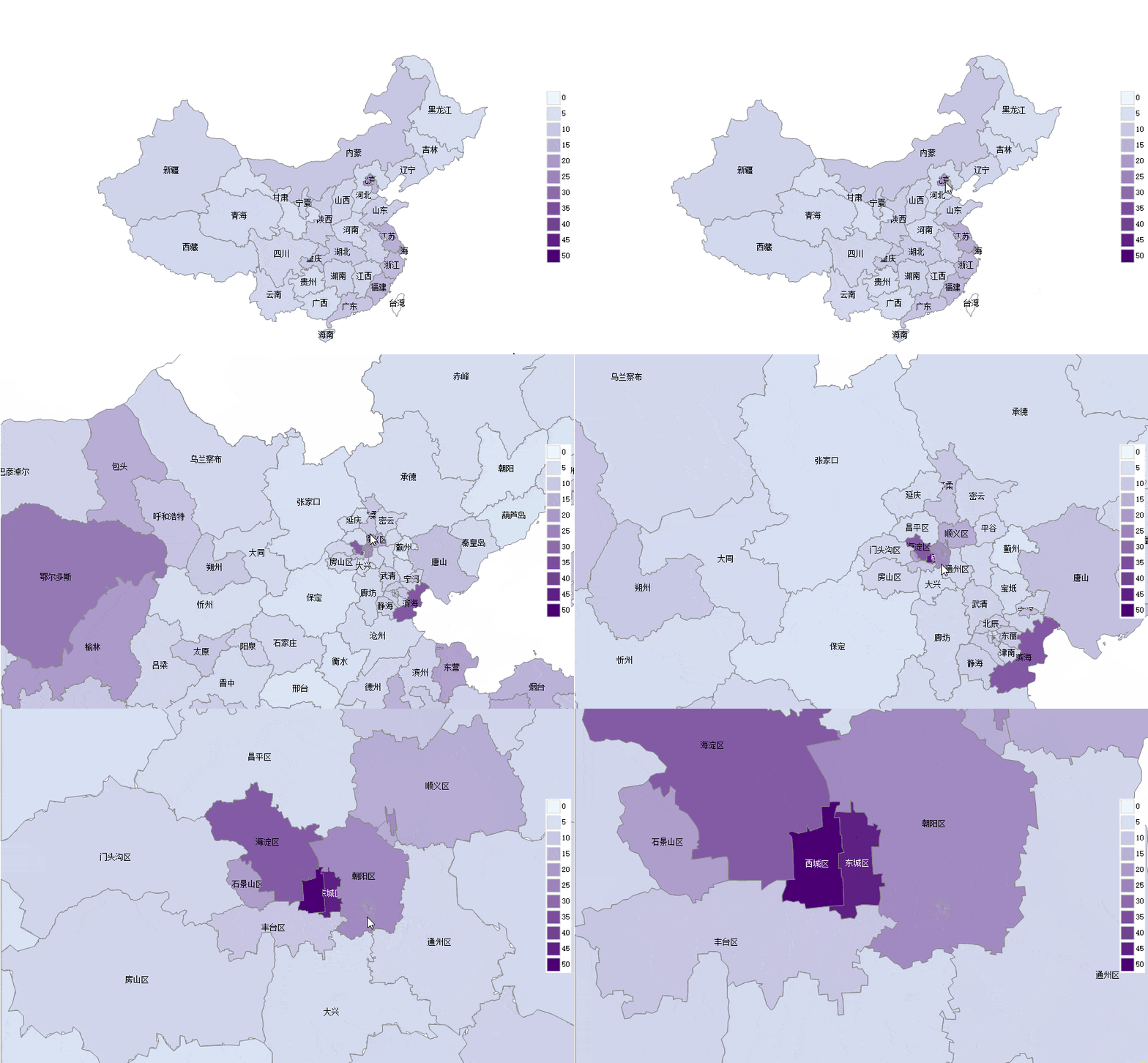
综合示例
本示例内容可以参考CaseStudy目录下的文件"地图.Table"的示例十九。
本节综合使用了前面的一些知识,同时用颜色深浅标记省和市两级行政区的人均GDP:
提示:本节的代码使用了lambda过程,如果你还不熟悉,请参考:使用lambda过程
示例
1、将Map控件的"地图来源"属性设置为"None"
2、将窗口的AfterLoad事件代码设置为:
Dim
map
As
GeoMap = e.Form.Controls("Map1").GeoMap
Dim
minValue
As
Double
= DataTables("市").Compute("Min(人均GDP)")
Dim
maxValue
As
Double
= DataTables("市").Compute("Max(人均GDP)")
Dim
minColor
As
Color = Color.FromArgb(230, 247, 255)
'
浅蓝
Dim
maxColor
As
Color = Color.FromArgb(74, 0, 114)
'深紫
'定义一个lambda过程,用于根据GDP计算背景颜色
Dim
getValueColor =
Function(tValue
As
Double)
Dim
radio
As
Double
tValue = Math.Min(tValue, maxValue)
radio = tValue / maxValue
Dim
red
As
Byte
= minColor.R + (CInt(maxColor.R)
-
CInt(minColor.R))
* radio
Dim
green
As
Byte
= minColor.G +
CInt((maxColor.G)
-
CInt(minColor.G))
* radio
Dim
blue
As
Byte
= minColor.B + (CInt(maxColor.B)
-
CInt(minColor.B))
* radio
Return
Color.FromArgb(red, green, blue)
End
Function
'定义一个lambda过程,用于绘制行政区域
Dim
AddRegion =
Sub(tlayer
As
VectorLayer, tgeoRow
As
DataRow, tadRow
As
DataRow)
Dim
polygon
As
VectorPolygon = map.CreatePolygon(tgeoRow("geometry"),
5)
tlayer.Items.Add(Polygon)
Dim
gdp
As
Double
If
tadRow
IsNot
Nothing
Then
gdp = tadRow("人均GDP")
polygon.Style.BackColor = getValueColor.Invoke(gdp)
polygon.Tag = tgeoRow("name")
&
":"
& gdp
Else
polygon.Tag = tgeoRow("name")
End
If
Dim
mark
As
New
VectorPlacemark()
'增加标记
mark.Geometry =
New
GeoPoint(tgeoRow("centroidX"),
tgeoRow("centroidY"))
mark.Marker.Caption = tgeoRow("name")
'指定标题
mark.Marker.LabelPosition = LabelPosition.Center
'标题显示在标记的中心位置
If
gdp >= 40
Then
'如果人均GDP大于40万,将标题颜色设置为白色
mark.LabelStyle.ForeColor = Color.White
End
If
tlayer.Items.Add(mark)
End
Sub
'绘制省级行政区
Dim
layer
As
New
VectorLayer()
layer.LabelVisibility = LabelVisibility.AutoHide
map.Layers.Add(layer)
layer.MaxZoom = 4.99999999
layer.Style.Stroke.Color = Color.Gray
For
Each
geoRow
As
DataRow
In
DataTables("行政区域").Select("Level
= 1")
Dim
adRow
As
DataRow = DataTables("省").Find("省代码
= '"
& geoRow("adcode")
&
"'")
AddRegion.Invoke(layer, geoRow, AdRow)
Next
'绘制市级行政区
layer =
New
VectorLayer()
layer.LabelVisibility=LabelVisibility.AutoHide
map.Layers.Add(layer)
layer.MinZoom = 5
layer.Style.Stroke.Color = Color.Gray
For
Each
geoRow
As
DataRow
In
DataTables("行政区域").Select("parentLevel
= 1")
Dim
adRow
As
DataRow = DataTables("市").Find("市代码
= '"
& geoRow("adcode")
&
"'")
AddRegion.Invoke(layer, geoRow, AdRow)
Next
'增加图例
Dim
legend
As
New
MapLegend
'定义图例
map.Legends.Add(legend)
'增加图例
legend.Alignment = ContentAlignment.MiddleRight
'图例位置为中间靠右
legend.Layout = MapLegendLayout.Column
'垂直显示
legend.Style.BackColor = Color.White
'设置背景颜色为白色,避免和地图重叠的时候难以识别
legend.Margin =
New
Padding(10)
'边距设置为10,避免图例紧贴在窗口边框
For
value
As
Integer
= 0
To
maxvalue
Step
5
'从0开始,以5(万)为间隔增加一个图例项目
Dim
item
As
New
MapLegendItem
item.Size =
New
Size(20, 20)
item.Kind = C1.FlexMap.MapLegendItemKind.Rectangle
item.Style.BackColor = getValueColor.Invoke(value)
'如果不想使用渐变,可以不设置BackColor2
item.Style.BackColor2 = getValueColor.Invoke(value + 5)
item.Style.Stroke.Color = Color.LightGray
item.Style.Alignment = ContentAlignment.MiddleLeft
item.Label = value.ToString()
legend.Items.Add(item)
Next