动态增加删除移动标记
本节内容可以参考CaseStudy目录下的文件"地图.Table"的示例三十二。
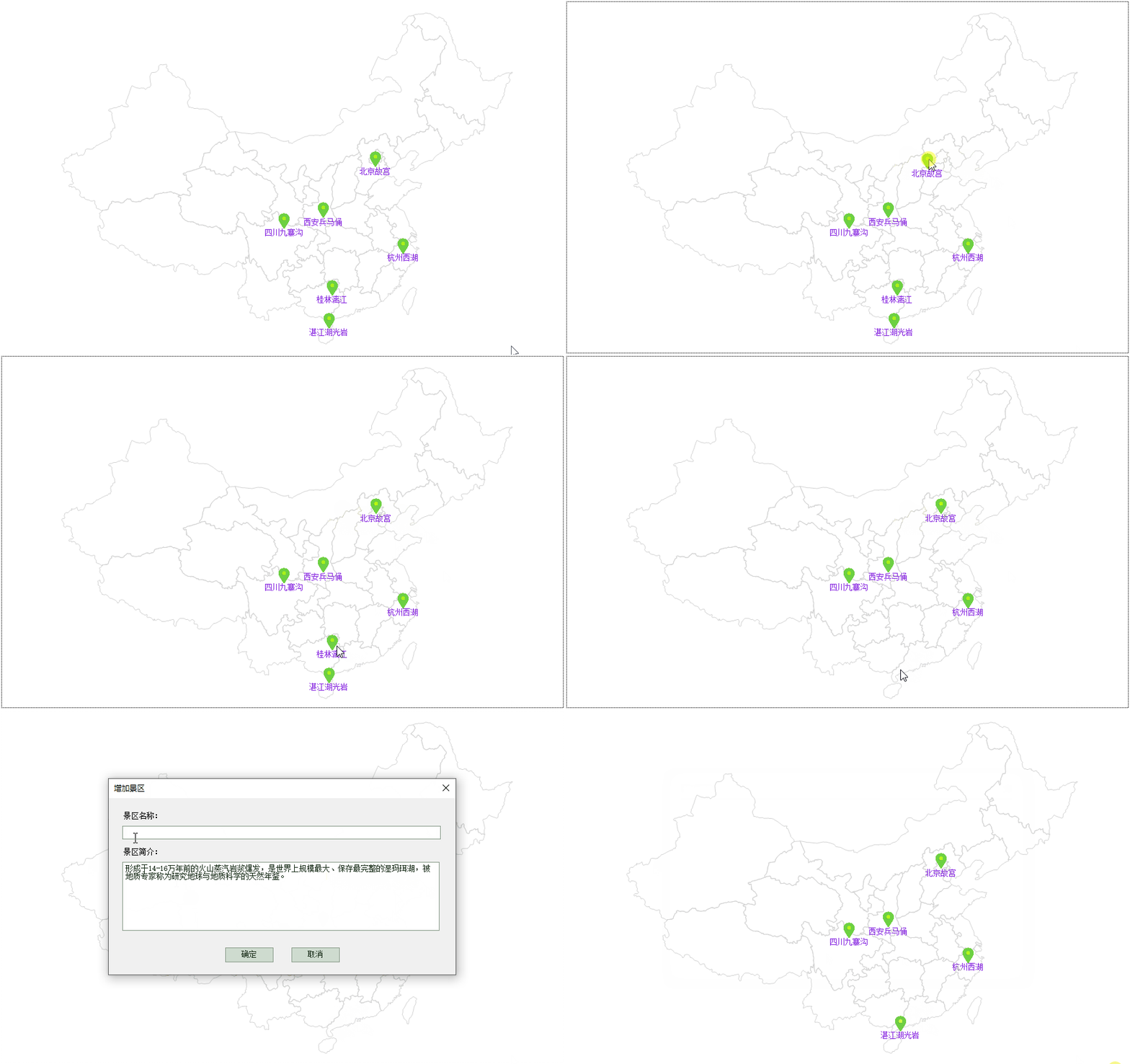
本节的任务是:
1、按住Shift键,可以通过拖动鼠标来移动标记
2、按住Alt键,可以删除单击的标记
3、按住Ctrl键单击空白位置,可以增加标记。
如下图:
本示例也是一个很好的灵活使用var变量在不同事件中传递对象和数据的例子。
实现过程:
1、窗口的AfterLoad事件代码:
Dim
map
As
GeoMap = e.Form.Controls("Map1").GeoMap
Dim
layer
As
New
VectorLayer()
map.Layers.Add(layer)
layer.Style.Stroke.Color = Color.LightGray
layer.LabelStyle.ForeColor = Color.BlueViolet
layer.LabelVisibility =LabelVisibility.AutoHide
'绘制省级行政区域
For
Each
dr
As
DataRow
In
DataTables("行政区域").Select("level=
1")
layer.Items.Add(map.CreatePolygon(dr("geometry"),
5))
Next
'准备景点使用的标记图片
Vars("Location")
= map.CreateImageShape("location.png")
'定义指定图片的的形状,并存放在Var变量中,方便在其他事件使用
'绘制景点
For
Each
dr
As
DataRow
In
DataTables("景区").DataRows
Dim
mark
As
New
VectorPlacemark()
mark.Tag = dr("简介")
mark.Marker.Size =
New
Size(24, 24)
mark.Geometry =
New
GeoPoint(dr("经度"),
dr("纬度"))
mark.Marker.Shape = MarkerShape.Custom
'指明标记使用自定义形状
mark.Marker.CustomShape = Vars("Location")
'指定标记使用的形状
mark.Marker.Caption = dr("名称")
mark.Marker.LabelPosition = LabelPosition.Bottom
layer.Items.Add(mark)
Next
2、Map控件的MouseClick事件代码为:
If
e.Button <> MouseButtons.Left
Then
Return
'如果不是鼠标左键则退出
Dim
map
As
GeoMap = e.Form.Controls("Map1").GeoMap
Dim
ifo
As
HitTestInfo = map.HitTest(e.Location)
If
ifo
Is
Nothing
Then
Return
Dim
layer
As
VectorLayer = ifo.Layer
If
ModifierKey = Keys.Control
Then
'如果按下了Ctrl键,则增加景区
If
ifo.Vector
IsNot
Nothing
AndAlso
TypeOf
ifo.Vector
Is
VectorPlacemark
Then
'如果单击的是一个现有标记
Return
'则退出
End
If
Vars("Name")
=
""
Vars("Introduction")
=
""
Dim
gp
As
GeoPoint = map.MouseGeoPosition
'获取鼠标位置的经纬度坐标,注意必须在显示添加窗口前获取
Forms("增加景区").Show()
'增加景区窗口会将输入的景区名称和简介存放在对应的Var变量中
If
Vars("Name")
>
""
Then
'如果输入了景区名称
Dim
dr
As
DataRow = DataTables("景区").AddNew()
'增加一个景区
dr("名称")
= Vars("Name")
dr("简介")
= Vars("Introduction")
dr("经度")
= gp.X
dr("纬度")
= gp.Y
Dim
mark
As
New
VectorPlacemark()
'为新增的景区绘制标记
mark.Tag = dr("简介")
mark.Marker.Size =
New
Size(24, 24)
mark.Geometry =
New
GeoPoint(dr("经度"),
dr("纬度"))
mark.Marker.Shape = MarkerShape.Custom
'指明标记使用自定义形状
mark.Marker.CustomShape = Vars("Location")
'指定标记使用的形状
mark.Marker.Caption = dr("名称")
mark.Marker.LabelPosition = LabelPosition.Bottom
Layer.Items.Add(mark)
End
If
ElseIf
ModifierKey = Keys.Alt
Then
'如果按下了Alt键,则删除景区
If
ifo.Vector
IsNot
Nothing
AndAlso
TypeOf
ifo.Vector
Is
VectorPlacemark
Then
'如果单击的是一个现有标记
Dim
mark
As
VectorPlacemark = ifo.Vector
DataTables("景区").DeleteFor("名称
='"
& mark.Marker.Caption &
"'")
'删除数据
layer.Items.Remove(mark)
'移除标记
End
If
End
If
3、Map控件的MouseDown事件:
If
e.Button <> MouseButtons.Left
Then
Return
'如果不是鼠标左键则退出
Dim
map
As
GeoMap = e.Form.Controls("Map1").GeoMap
Dim
ifo
As
HitTestInfo = map.HitTest(e.Location)
If
ifo
Is
Nothing
Then
Return
If
ModifierKey = Keys.Shift
Then
'如果按下了Shift键,则移动标记
If
ifo.Vector
IsNot
Nothing
AndAlso
TypeOf
ifo.Vector
Is
VectorPlacemark
Then
'如果单击的是一个现有标记
Dim
mark
As
VectorPlacemark = ifo.Vector
Dim
gp
As
GeoPoint = mark.Geometry
'获取标记的经纬度位置
Dim
pt
As
PointF = map.ScreenToGeographic(e.Location).ToPointF()
'获取鼠标位置的经纬度位置
Vars("CurrentMark")
= mark
'将要移动的标记存储在Var变量总
Vars("Offset")
=
New
PointF(pt.X - gp.X, pt.Y - gp.Y)
'将位置偏差存储在Var变量中
End
If
End
If
4、Map控件的MouseMove事件代码:
If
e.Button <> MouseButtons.Left
Then
Return
'如果不是鼠标左键则退出
Dim
map
As
GeoMap = e.Form.Controls("Map1").GeoMap
Dim
ifo
As
HitTestInfo = map.HitTest(e.Location)
If
ModifierKey = Keys.Shift
Then
'如果按下了Shift键,则移动标记
If
Vars("CurrentMark")
IsNot
Nothing
Then
'如果有要移动的标记
Dim
mark
As
VectorPlacemark = Vars("CurrentMark")
'从Var变量获取要移动的标记
Dim
offset
As
PointF = Vars("Offset")
'从Var变量获取偏差
Dim
pt
As
PointF = map.ScreenToGeographic(e.Location).ToPointF()
'获取鼠标位置的经纬度位置
Dim
dr
As
DataRow = DataTables("景区").Find("名称
='"
& mark.Marker.Caption &
"'")
If
dr
IsNot
Nothing
Then
dr("经度")
= pt.X - offset.X
'鼠标位置减去偏差就是标记的新位置
dr("纬度")
= pt.Y - offset.Y
mark.Geometry =
New
GeoPoint(dr("经度"),
dr("纬度"))
'将标记移到新的位置
End
If
End
If
End
If
5、Map控件的MouseUp事件:
If
Vars("CurrentMark")
IsNot
Nothing
Then
Vars("CurrentMark")
=
Nothing
End
If
6、增加景区窗口的确定按钮的代码:
If
e.Form.Controls("txtName").Text
>
""
AndAlso
e.Form.Controls("txtIntroduction").Text
>
""
Then
Vars("Name")
= e.Form.Controls("txtName").Text
Vars("Introduction")
= e.Form.Controls("txtIntroduction").Text
e.Form.Close()
Else
MessageBox.Show("请输入景区名称和简介",
"提示",
MessageBoxButtons.OK, MessageBoxIcon.Asterisk)
End
If