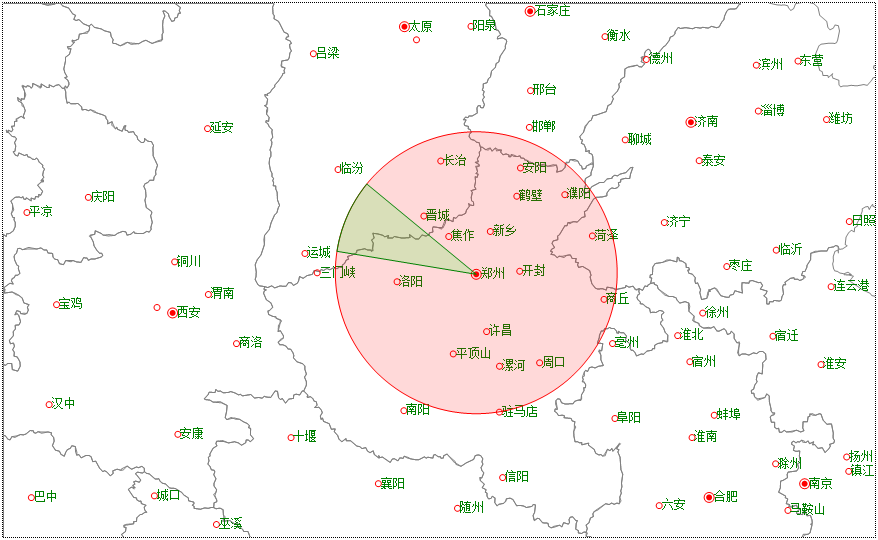
以郑州为圆心分别绘制一个圆和一个扇形,半径为200公里:
Dim map As GeoMap = e.Form.Controls("Map1").GeoMap
Dim layer As VectorLayer = map.Layers(0)
'以郑州为圆心,绘制一个半径为200公里的圆
Dim centerPoint As New GeoPoint(113.6654, 34.758) '郑州的经纬度
Dim points As New List(Of GeoPoint)
For angle As Integer = 0 To 359 Step 1 '圆的精细生成由step决定
points.Add( map.GetGeoPointByDistanceAngle(centerPoint, 200, angle))
Next
Dim circle As VectorPolygon = map.CreatePolygon(points) '注意是CreatePolygon,不是CreteCircle
circle.Style.Stroke.Color = Color.Red
circle.Style.BackColor = Color.FromArgb(38, 255, 0, 0)
layer.Items.Add(circle)
'以郑州为圆心,绘制一个弧形,扫描角范围190度到220度:
points.Clear()
points.Add(centerPoint)
For angle As Integer = 190 To 220 Step 1 '扇形的精细生成由step决定
points.Add( map.GetGeoPointByDistanceAngle(centerPoint, 200, angle))
Next
Dim pie As VectorPolygon = map.CreatePolygon(points) '注意是CreatePolygon,不是CreteCircle
pie.Style.Stroke.Color = Color.Green
pie.Style.BackColor = Color.FromArgb(38, 0, 255, 0)
layer.Items.Add(pie)
绘制的圆和扇形在每个方向距离郑州都为200公里:
你当然也可以这样绘制同一个圆:
Dim map As GeoMap = e.Form.Controls("Map1").GeoMap
Dim layer As VectorLayer = map.Layers(0)
Dim centerPoint As New GeoPoint(113.6654, 34.758) '郑州的经纬度
Dim points As New List(Of GeoPoint)
'距离郑州正西方向200公里的一个点
Dim circlePoint As GeoPoint = map.GetGeoPointByDistanceAngle(centerPoint, 200, 180)
Dim circle As VectorPolygon = map.CreateCircle(centerPoint, circlePoint, True)
circle.Style.Stroke.Color = Color.Green
circle.Style.BackColor = Color.FromArgb(38, 0, 255, 0)
layer.Items.Add(circle)