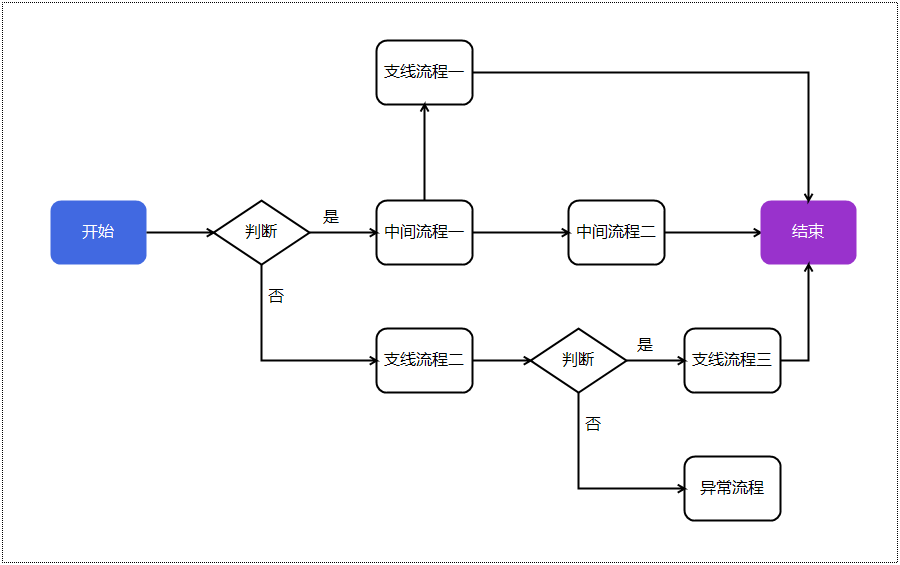
圆角四边形的绘制
本节内容可以参考文件"\CaseStudy\流程图\纯代码流程图\纯代码绘制之五.Table"
使用GDI+绘制流程的最大的好处是随心所欲,你愿意怎么画都行,无需局限于内置的形状。
例如你想将流程图中的四边形变成圆角的,如下图:
只需在上一节的基础上,将Map控件的OwerDrawMark事件的代码改为:
'定义一个lambda函数,用于计算圆角四边形的路径
Dim
CreateRoundedRectanglePath =
Function(tRect
As
Rectangle, tRadius
As
Integer)
Dim
tPath
As
New
GraphicsPath()
tRadius = Math.Min( tRadius, Math.Min(tRect.Width / 2, tRect.Height / 2))
If
tRadius <= 0
Then
tPath.AddRectangle(tRect)
Return
tPath
End
If
tPath.AddArc(tRect.X, tRect.Y, tRadius * 2, tRadius * 2, 180F, 90F)
tPath.AddLine(tRect.X + tRadius, tRect.Y, tRect.Right - tRadius, tRect.Y)
tPath.AddArc(tRect.Right - tRadius * 2, tRect.Y, tRadius * 2, tRadius * 2,
270F, 90F)
tPath.AddLine(tRect.Right, tRect.Y + tRadius, tRect.Right, tRect.Bottom -
tRadius)
tPath.AddArc(tRect.Right - tRadius * 2, tRect.Bottom - tRadius * 2, tRadius
* 2, tRadius * 2, 0F, 90F)
tPath.AddLine(tRect.Right - tRadius, tRect.Bottom, tRect.X + tRadius,
tRect.Bottom)
tPath.AddArc(tRect.X, tRect.Bottom - tRadius * 2, tRadius * 2, tRadius * 2,
90F, 90F)
tPath.AddLine(tRect.X, tRect.Bottom - tRadius, tRect.X, tRect.Y + tRadius)
tPath.CloseAllFigures()
Return
tPath
End
Function
If
e.ShapeTag
IsNot
Nothing
AndAlso
TypeOf
e.ShapeTag
Is
DataRow
Then
Dim
dr
As
DataRow = e.ShapeTag
Dim
brush
As
Brush = Brushes.Black
Dim
pen
As
New
Pen(color.Black)
pen.Width = 2
Dim
rect
As
Rectangle = Rectangle.Round(e.Bounds)
Select
Case
dr("类型")
Case
"四边形"
Dim
rectPath
As
GraphicsPath = CreateRoundedRectanglePath.Invoke(rect, 10)
'10为圆角半径
Select
Case
dr("文本")
Case
"开始"
e.Graphics.FillPath(Brushes.RoyalBlue, rectPath)
brush = Brushes.White
Case
"结束"
e.Graphics.FillPath(Brushes.DarkOrchid, rectPath)
brush = Brushes.White
Case
Else
e.Graphics.DrawPath(pen, rectPath)
End
Select
Case
"菱形"
Dim
p1
As
New
PointF(rect.X, rect.Y + rect.Height / 2)
'左顶点
Dim
p2
As
New
PointF(rect.X + rect.Width / 2, rect.Y)
'上顶点
Dim
p3
As
New
PointF(rect.X + rect.Width , rect.Y + rect.Height / 2)
'右顶点
Dim
p4
As
New
PointF(rect.X + rect.Width / 2, rect.Y + rect.Height)
'下顶点
e.Graphics.DrawPolygon(pen, {p1, p2, p3, p4})
'绘制菱形
End
Select
Dim
fnt
As
New
Font("微软雅黑",
12)
Dim
fmt
As
New
StringFormat()
fmt.Alignment = StringAlignment.Center
fmt.LineAlignment = StringAlignment.Center
e.Graphics.DrawString(dr("文本"),
fnt, brush, rect, fmt)
End
If