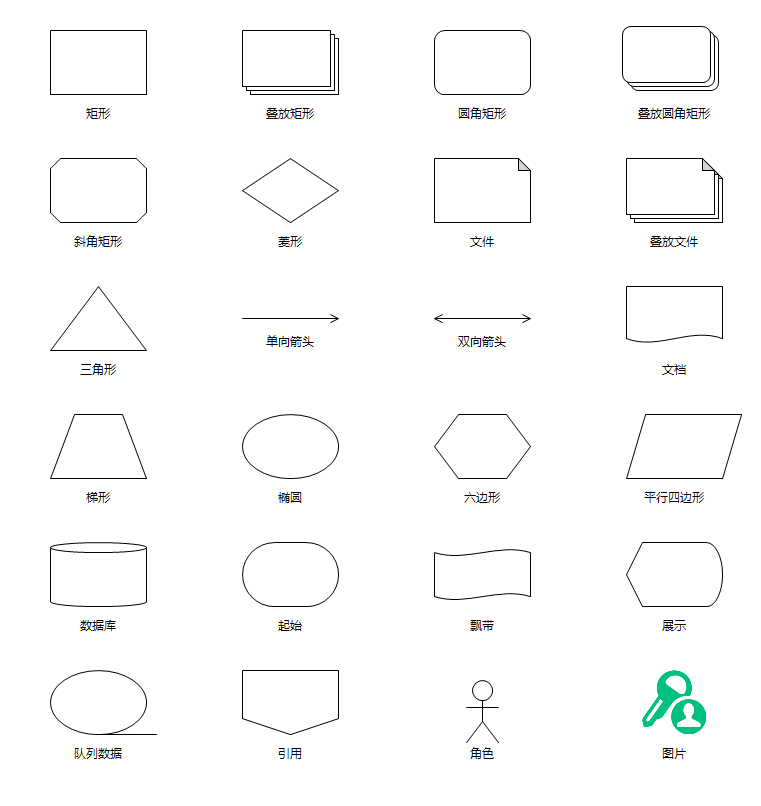
常用流程图符号的绘制
本节内容可以参考文件"\CaseStudy\流程图\纯代码流程图\纯代码绘制之六.Table"
上一节介绍了用GDI+绘制圆角矩形,这一节的任务是用GDI+绘制所有常用的流程图符号 ,大家需要的时候可以直接复制套用:
首先用一个表指定了所有形状的位置,这里所有形状的大小一致,所以只需指定位置即可:
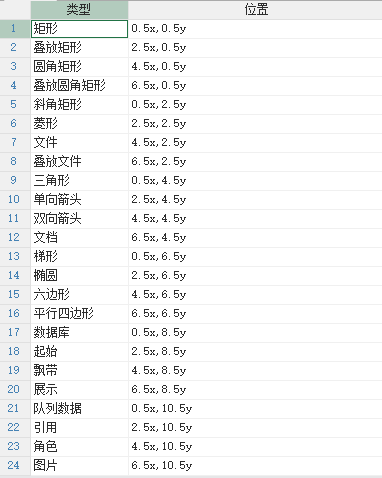
代码分布在三个事件中。
1、窗口的AfterLoad事件的代码用于定位形状,代码没有变化:
'初始化地图控件,不是必须的,只是使得地图控件更适合作为流程图控件使用:
Dim
map
As
GeoMap = e.Form.Controls("Map1").GeoMap
map.UseGallPetersProjection =
True
'采用Gall
Peters投影方式
map.Viewport.Limits.MaxLat = 60
'排除高纬度地区,因为高纬度地区变形大
map.Viewport.Limits.MinLat = -60
map.Zoom = 12
'缩放指数设置为12,留足够的区间用于放大和缩小
map.CenterTo( - 160, 50)
'中心点设置在有效区域的左上,因为通常都是往右下绘制,同时也留有一定的余地往左上绘制
'增加矢量层:
Dim
layer
As
New
VectorLayer()
map.Layers.Add(layer)
layer.Style.Stroke.Width = 2
layer.Style.Font =
New
Font("微软雅黑",
9)
'用代码绘制流程图,注意以下定位均采用像素,在绘制时候要转为经纬度,
Dim
xStart
As
Integer
= 50
Dim
yStart
As
Integer
= 30
Dim
xStep
As
Integer
= 96
'默认形状宽度,也是箭头的默认长度
Dim
yStep
As
Integer
= 64
'默认形状高度,宽高比大概是3:2,
96*2/3 = 64
For
Each
dr
As
DataRow
In
DataTables("流程图").DataRows
'绘制流程图
Dim
gps
As
New
List(Of
GeoPoint)
Dim
pts()
As
String
= dr("位置").Split(",")
For
idx
As
Integer
= 0
To
pts.Length - 1
Step
2
Dim
dx
As
Integer
= xStart + Val(pts(idx)) * xStep
Dim
dy
As
Integer
= yStart + Val(pts(idx + 1)) * yStep
Dim
p
As
New
Point(dx, dy)
gps.Add(map.ToGeoPoint(p))
Next
Dim
mark
As
New
VectorPlacemark()
mark.Geometry = gps(0)
mark.Marker.Shape = MarkerShape.Custom
'指定采用标记使用自定形状
mark.Marker.CustomShape = map.CreateMarkShape(dr)
'将数据行设置为ShapeTag,方便OwerDrawMark事件调用
mark.Tag = dr
'将tag设置为对应的数据行,用于响应事件
layer.Items.Add(mark)
Next
2、Map控件的GetDrawingBounds事件 的代码用于计算形状的位置和大小:
If
e.ShapeTag
IsNot
Nothing
AndAlso
TypeOf
e.ShapeTag
Is
DataRow
Then
Dim
dr
As
DataRow = e.ShapeTag
Dim
cx
As
Single
= e.Bounds.X + e.Bounds.Width / 2
'先计算中心点位置
Dim
cy
As
Single
= e.Bounds.Y + e.Bounds.Height / 2
Dim
width
As
Single
= 96
Dim
height
As
Single
= 64
If
dr("类型")
=
"单向箭头"
OrElse
dr("类型")
=
"双向箭头"
Then
height = 8
End
If
e.Bounds =
New
RectangleF(cx - width / 2, cy - height / 2, width, height)
End
If
3、Map控件的OwerDrawMark事件的代码如下,代码比较长,但绘制出了所有的常用形状,方便大家今后参考套用:
'定义一个lambda函数,用于计算圆角矩形的路径
Dim
CreateRoundedRectanglePath =
Function(tRect
As
Rectangle, tRadius
As
Integer)
Dim
tPath
As
New
GraphicsPath()
tRadius = Math.Min( tRadius, Math.Min(tRect.Width / 2, tRect.Height / 2))
If
tRadius <= 0
Then
tPath.AddRectangle(tRect)
Return
tPath
End
If
tPath.AddArc(tRect.X, tRect.Y, tRadius * 2, tRadius * 2, 180F, 90F)
tPath.AddLine(tRect.X + tRadius, tRect.Y, tRect.Right - tRadius, tRect.Y)
tPath.AddArc(tRect.Right - tRadius * 2, tRect.Y, tRadius * 2, tRadius * 2,
270F, 90F)
tPath.AddLine(tRect.Right, tRect.Y + tRadius, tRect.Right, tRect.Bottom -
tRadius)
tPath.AddArc(tRect.Right - tRadius * 2, tRect.Bottom - tRadius * 2, tRadius
* 2, tRadius * 2, 0F, 90F)
tPath.AddLine(tRect.Right - tRadius, tRect.Bottom, tRect.X + tRadius,
tRect.Bottom)
tPath.AddArc(tRect.X, tRect.Bottom - tRadius * 2, tRadius * 2, tRadius * 2,
90F, 90F)
tPath.AddLine(tRect.X, tRect.Bottom - tRadius, tRect.X, tRect.Y + tRadius)
tPath.CloseAllFigures()
Return
tPath
End
Function
'定义一个lambda函数,用于绘制文件矩形,ctlg参数为截线长度
Dim
DrawFileRectangle =
Function(tGraphics
As
Graphics, tRect
As
Rectangle, ctlg
As
Integer,
tPen
As
Pen)
Dim
p1
As
New
Point(tRect.X, tRect.Y)
Dim
p2
As
New
Point(tRect.Right - ctlg, tRect.Y)
Dim
p3
As
New
Point(tRect.Right, tRect.Y + ctlg)
Dim
p4
As
New
Point(tRect.Right, tRect.Bottom)
Dim
p5
As
New
Point(tRect.x, tRect.Bottom)
Dim
p0
As
New
Point(tRect.Right - ctlg, tRect.Y + ctlg)
tGraphics.FillPolygon(Brushes.White , {p1, p2, p3, p4, p5})
tGraphics.DrawPolygon(tPen , {p1, p2, p3, p4, p5})
tGraphics.FillPolygon(Brushes.LightGray, {p0, p2, p3})
tGraphics.DrawPolygon(tPen, {p0, p2, p3})
End
Function
If
e.ShapeTag
IsNot
Nothing
AndAlso
TypeOf
e.ShapeTag
Is
DataRow
Then
Dim
dr
As
DataRow = e.ShapeTag
Dim
brush
As
Brush = Brushes.Black
Dim
pen
As
New
Pen(color.Black, 1)
Dim
rect
As
Rectangle = Rectangle.Round(e.Bounds)
'用Round方法将RectangleF转换为Rectangle再绘制
Select
Case
dr("类型")
Case
"矩形"
e.Graphics.DrawRectangle(pen, rect)
Case
"椭圆"
e.Graphics.DrawEllipse(pen, rect)
Case
"叠放矩形"
'假定叠放三个矩形,每个矩形间隔4个像素
rect.Width = rect.Width - 8
rect.Height = rect.Height - 8
rect.Offset(8, 8)
For
i
As
Integer
= 0
To
2
e.Graphics.FillRectangle(Brushes.White, rect)
e.Graphics.DrawRectangle(pen, rect)
rect.Offset( - 4, - 4)
Next
Case
"圆角矩形"
Dim
path
As
GraphicsPath = CreateRoundedRectanglePath.Invoke(rect, 10)
'10为圆角半径
e.Graphics.DrawPath(pen, path)
Case
"叠放圆角矩形"
'假定叠放三个圆角矩形,每个矩形间隔4个像素
rect.Width = rect.Width - 8
rect.Height = rect.Height - 8
rect.Offset(4, 4)
For
i
As
Integer
= 0
To
2
Dim
path
As
GraphicsPath = CreateRoundedRectanglePath.Invoke(rect, 8)
'8为圆角半径
e.Graphics.FillPath(Brushes.White, path)
e.Graphics.DrawPath(pen, path)
rect.Offset( - 4, - 4)
Next
Case
"斜角矩形"
Dim
obl
As
Integer
= 10
'假定每个角切掉10像素
Dim
p1
As
New
Point(rect.X + obl, rect.Y)
Dim
p2
As
New
Point(rect.Right - obl, rect.Y)
Dim
p3
As
New
Point(rect.Right, rect.Y + obl)
Dim
p4
As
New
Point(rect.Right, rect.Bottom - obl)
Dim
p5
As
New
Point(rect.Right - obl, rect.Bottom)
Dim
p6
As
New
Point(rect.x + obl, rect.Bottom)
Dim
p7
As
New
Point(rect.x , rect.Bottom - obl)
Dim
p8
As
New
Point(rect.x, rect.y + obl)
e.Graphics.DrawPolygon(pen , {p1, p2, p3, p4, p5, p6, p7, p8})
Case
"菱形"
Dim
p1
As
New
Point(rect.X + rect.Width / 2, rect.Y)
Dim
p2
As
New
Point(rect.Right, rect.y + rect.Height / 2)
Dim
p3
As
New
Point(rect.X + rect.Width / 2, rect.Bottom)
Dim
p4
As
New
Point(rect.x, rect.y + rect.Height / 2)
e.Graphics.DrawPolygon(pen , {p1, p2, p3, p4})
Case
"文件"
DrawFileRectangle.Invoke(e.Graphics, rect, 12, pen)
'12为截角长度
Case
"叠放文件"
'假定叠放三个文件框,每个文件框间隔4个像素
rect.Width = rect.Width - 8
rect.Height = rect.Height - 8
rect.Offset(8, 8)
For
i
As
Integer
= 0
To
2
DrawFileRectangle.Invoke(e.Graphics, rect, 12, pen)
'12为截角长度
rect.Offset( - 4, - 4)
Next
Case
"三角形"
Dim
p1
As
New
Point(rect.X + rect.Width / 2, rect.Y)
Dim
p2
As
New
Point(rect.Right, rect.Bottom)
Dim
p3
As
New
Point(rect.X, rect.Bottom)
e.Graphics.DrawPolygon(pen , {p1, p2, p3})
Case
"单向箭头"
Dim
p1
As
New
Point(rect.X, rect.Y + rect.Height / 2)
Dim
p2
As
New
Point(rect.Right , rect.Y + rect.Height / 2)
Dim
p3
As
New
Point(rect.Right - 8, rect.Y)
Dim
p4
As
New
Point(rect.Right - 8, rect.Bottom)
e.Graphics.DrawLines(pen , {p1, p2, p3, p2, p4})
Case
"双向箭头"
Dim
p1
As
New
Point(rect.X, rect.Y + rect.Height / 2)
Dim
p2
As
New
Point(rect.X + rect.Width , rect.Y + rect.Height / 2)
Dim
p3
As
New
Point(rect.X + rect.Width - 8, rect.Y)
Dim
p4
As
New
Point(rect.X + rect.Width - 8, rect.Y + rect.Height)
Dim
p5
As
New
Point(rect.X + 8, rect.Y)
Dim
p6
As
New
Point(rect.X + 8, rect.Y + rect.Height)
e.Graphics.DrawLines(pen , {p1, p2, p3, p2, p4, p2, p1, p5, p1, p6})
Case
"文档"
Dim
crh
As
Integer
= 12
'波峰高度
Dim
path
As
New
GraphicsPath()
'以后可能需要实心的,所以用GraphicsPath
Dim
p1
As
New
Point(rect.X, rect.Y)
Dim
p2
As
New
Point(rect.X + rect.Width, rect.Y)
Dim
p3
As
New
Point(rect.X + rect.Width, rect.Y + rect.Height - crh)
Dim
p4
As
New
Point(rect.x, rect.Y + rect.Height - crh)
Dim
p5
As
New
Point(rect.X + rect.Width / 3, rect.Y + rect.Height)
Dim
p6
As
New
Point(rect.X + rect.Width / 3 * 2, rect.Y + rect.Height - crh * 2)
path.AddLines({p4, p1, p2, p3})
path.AddBezier(p3, p6, p5, p4)
e.Graphics.DrawPath(pen, path)
Case
"梯形"
Dim
p1
As
New
Point(rect.X + rect.Width / 4, rect.Y)
Dim
p2
As
New
Point(rect.X + rect.Width / 4 * 3, rect.Y)
Dim
p3
As
New
Point(rect.X + rect.Width , rect.Y + rect.Height)
Dim
p4
As
New
Point(rect.x, rect.Y + rect.Height)
e.Graphics.DrawPolygon(pen, {p1, p2, p3, p4})
Case
"六边形"
Dim
p1
As
New
Point(rect.X + rect.Width / 4, rect.Y)
Dim
p2
As
New
Point(rect.X + rect.Width / 4 * 3, rect.Y)
Dim
p3
As
New
Point(rect.X + rect.Width , rect.Y + rect.Height / 2)
Dim
p4
As
New
Point(rect.X + rect.Width / 4 * 3, rect.Y + rect.Height)
Dim
p5
As
New
Point(rect.X + rect.Width / 4 , rect.Y + rect.Height)
Dim
p6
As
New
Point(rect.X , rect.Y + rect.Height / 2)
e.Graphics.DrawPolygon(pen, {p1, p2, p3, p4, p5, p6})
Case
"平行四边形"
Dim
p1
As
New
Point(rect.X + rect.Width / 5 , rect.Y)
Dim
p2
As
New
Point(rect.X + rect.Width / 5 * 6 , rect.Y)
Dim
p3
As
New
Point(rect.X + rect.Width , rect.Y + rect.Height)
Dim
p4
As
New
Point(rect.x, rect.Y + rect.Height)
e.Graphics.DrawPolygon(pen, {p1, p2, p3, p4})
Case
"数据库"
Dim
path
As
New
GraphicsPath()
Dim
epht
As
Integer
= Math.Max(rect.Height \ 6, 8)
'
椭圆高度,至少8像素
path.AddEllipse(New
Rectangle(rect.X, rect.Y, rect.Width, epht))
'顶部椭圆
path.AddLine( rect.Right, rect.Y + epht \ 2, rect.Right, rect.Bottom
- epht \ 2)
'右侧直线
path.AddArc( rect.X, rect.Bottom - epht, rect.Width, epht, 0, 180)
'底部弧线
path.AddLine(rect.X, rect.Y + epht \ 2, rect.X, rect.Bottom - epht \
2)
'左侧直线
e.Graphics.DrawPath(pen, path)
Case
"角色"
'
绘制人形角色符号
Dim
centerX
As
Integer
= rect.X + rect.Width \ 2
'计算中心坐标
Dim
centerY
As
Integer
= rect.Y + rect.Height \ 2
Dim
headRadius
As
Integer
= Math.Min(rect.Width, rect.Height) \ 6
'
计算各部分的尺寸
Dim
bodyLength
As
Integer
= rect.Height \ 3
Dim
armLength
As
Integer
= rect.Width \ 3
Dim
legLength
As
Integer
= rect.Height \ 3
'
绘制头部(圆形)
Dim
headRect
As
New
Rectangle(centerX - headRadius, rect.Y + headRadius, headRadius * 2, headRadius
* 2)
e.Graphics.DrawEllipse(pen, headRect)
'
绘制身体(垂直线)
Dim
bodyTop
As
Integer
= headRect.Bottom
Dim
bodyBottom
As
Integer
= bodyTop + bodyLength
e.Graphics.DrawLine(pen, centerX, bodyTop, centerX, bodyBottom)
'
绘制手臂(水平线)
Dim
armY
As
Integer
= bodyTop + bodyLength \ 3
e.Graphics.DrawLine(pen, centerX - armLength \ 2, armY, centerX +
armLength \ 2, armY)
'
绘制腿部(两条斜线)
Dim
legTop
As
Integer
= bodyBottom
e.Graphics.DrawLine(pen, centerX, legTop, centerX - armLength \ 2,
legTop + legLength)
e.Graphics.DrawLine(pen, centerX, legTop, centerX + armLength \ 2,
legTop + legLength)
Case
"起始"
Dim
path
As
GraphicsPath = CreateRoundedRectanglePath.Invoke(rect, rect.Height / 2)
'10为圆角半径
e.Graphics.DrawPath(pen, path)
Case
"飘带"
Dim
crh
As
Integer
= Math.Max(rect.Height \ 6, 10)
'波峰高度,最少10个像素
Dim
path
As
New
GraphicsPath()
'以后可能需要实心的,所以用GraphicsPath
rect.Inflate(0, - crh)
Dim
p1
As
New
Point(rect.X, rect.Y)
Dim
p2
As
New
Point(rect.Right, rect.Y)
Dim
p3
As
New
Point(rect.Right, rect.Bottom)
Dim
p4
As
New
Point(rect.x, rect.Bottom)
Dim
p5
As
New
Point(rect.X + rect.Width / 3, rect.Y + crh)
Dim
p6
As
New
Point(rect.X + rect.Width / 3 * 2, rect.Y - crh)
Dim
p7
As
New
Point(rect.X + rect.Width / 3, rect.Bottom + crh)
Dim
p8
As
New
Point(rect.X + rect.Width / 3 * 2, rect.Bottom - crh)
path.AddLine(p4, p1)
path.AddBezier(p1, p5, p6, p2)
path.AddLine(p2, p3)
path.AddBezier(p3, p8, p7, p4)
e.Graphics.DrawPath(pen, path)
Case
"展示"
Dim
path
As
New
GraphicsPath()
Dim
epht
As
Integer
= Math.Max(rect.Width \ 6, 12)
'
椭圆宽度,至少12像素
Dim
p1
As
New
Point(rect.Right - epht, rect.Y)
Dim
p2
As
New
Point(rect.X + epht, rect.y)
Dim
p3
As
New
Point(rect.X, rect.Y + rect.Height / 2)
Dim
p4
As
New
Point(rect.X + epht, rect.y + rect.Height)
Dim
p5
As
New
Point(rect.Right - epht, rect.Y + rect.Height)
Dim
elprect
As
New
Rectangle(rect.Right - 2 * epht, rect.Y, epht * 2, rect.Height)
'椭圆矩形
path.AddLines({p1, p2, p3, p4, p5})
path.AddArc(elprect, 90, - 180)
e.Graphics.DrawPath(pen, path)
Case
"队列数据"
e.Graphics.DrawEllipse(pen, rect)
e.Graphics.DrawLine(pen,
New
Point(rect.X + rect.Width / 2, rect.Bottom),
New
Point(rect.Right + 10, rect.Bottom))
Case
"引用"
Dim
p1
As
New
Point(rect.X, rect.y)
Dim
p2
As
New
Point(rect.Right, rect.Y)
Dim
p3
As
New
Point(rect.Right, rect.Y + rect.Height * 3 / 4)
Dim
p4
As
New
Point(rect.x + rect.Width / 2, rect.Bottom)
Dim
p5
As
New
Point(rect.X, rect.Y + rect.Height * 3 / 4)
e.Graphics.DrawPolygon(pen, {p1, p2, p3, p4, p5})
Case
"图片"
rect.Inflate(-(rect.Width - rect.Height) / 2, 0)
e.Graphics.DrawImage(GetImage("角色.png"),
rect)
End
Select
'在形状正下方绘制文本(形状类型)
e.Bounds =
New
RectangleF(e.Bounds.X, e.Bounds.Y + e.Bounds.Height + 10, e.Bounds.Width, 20)
Dim
fnt
As
New
Font("微软雅黑",
9)
Dim
fmt
As
New
StringFormat()
fmt.Alignment = StringAlignment.Center
fmt.LineAlignment = StringAlignment.Center
e.Graphics.DrawString(dr("类型"),
fnt, brush, e.Bounds, fmt)
End
If