
使用本地资源
本节内容可以参考示例文件"CaseStudy\WebViewer\拦截响应.Table"的窗口"本地图片"。
对于非本地web应用,为提高性能,你可以将一些资源存储在本地,例如图片、css样式和js脚本等等,当网页需要访问这些资源时,直接使用本地文件,无需经过服务器。
随便找个浏览器,输入网址:
http://www.foxtable.com/localimage.htm
预期的图片没有显示:
这是因为网页中插入了两个并不存在的图片:
custom://chart/pie.png
custom://chart/bar.png
提示:不管图片(资源)是否真实存在,都可以拦截并使用本地文件的,这里插入不存在的图片是为了让测试更直观。
将 WebViewer的WebResourceRequested事件代码设置为:
Dim
wv
As
WebViewer = e.Sender.WebViewer
Dim
url = e.Request.Uri.ToLower()
If
url.StartsWith("custom://chart/")
Then
'如果使我们"胡编"的图片地址
If e.ResourceContext =
CoreWebView2WebResourceContext.Image
Then
'如果请求类型是图片
Dim
fl
As
String
= FileSys.GetName(url)
'获得图片文件名
If
fl >
""
Then
fl = ProjectPath & fl
'假定本地图片就在项目文件夹中
If
FileSys.FileExists(fl)
Then
'如果目标图片存在
Dim
stream
As Stream =
System.IO.File.OpenRead(fl)
'读取图片文件到内存流
e.Response =
wv.CoreWebView2.Environment.CreateWebResourceResponse(stream, 200,
"OK",
"Content-Type: image/png")
End
If
End
If
End
If
End
If
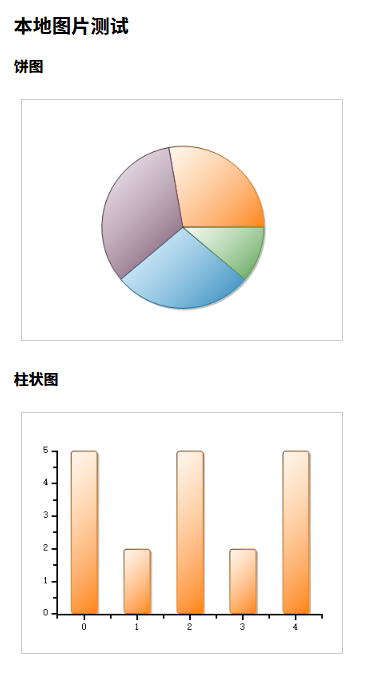
现在在窗口的地址栏中输入上述网址,就可以正常显示图片了:
关于Content-Type
这里假定你用的图片都是png格式,所以Content-Type设置为"image/png"。
需要注意的是,不同的图片格式,Content-Type是不同的,所以如果你用到多种图片,需要根图片格式设置对应的Content-Type。
下面的是常用图片格式对应的Content-Type:
png:image/png
jpg:image/jpeg
gif:image/gif
bmp:image/bmp
ico:image/x-icon
一切都可本地化
除了图片,所有资源都可以本地化,假定你希望本地化图片、css样式表和js脚本,三者分别存储在项目文件夹的chart、css和lib目录下,你可以这样编写 WebResourceRequested事件代码:
Dim
wv
As
WebViewer = e.Sender.WebViewer
Dim
url = e.Request.Uri.ToLower()
If
url.StartsWith("custom://chart/")
Then
If e.ResourceContext =
CoreWebView2WebResourceContext.Image
Then
'如果请求类型是图片
Dim
fl
As
String
= FileSys.GetName(url)
'获得图片文件名
If
fl >
""
Then
fl = ProjectPath & fl
'假定本地图片就在项目文件夹中
If
FileSys.FileExists(fl)
Then
'如果目标图片存在
Dim
stream
As
New
System.IO.MemoryStream(system.IO.File.ReadAllBytes(fl))
'读取图片文件到内存流
e.Response =
wv.CoreWebView2.Environment.CreateWebResourceResponse(stream, 200,
"OK",
"Content-Type: image/png")
End
If
End
If
End
If
ElseIf
url.StartsWith("custom://css/")
Then
If e.ResourceContext =
CoreWebView2WebResourceContext.Stylesheet
Then
'如果请求类型是css样式
Dim
fl
As
String
= FileSys.GetName(url)
If
fl >
""
Then
fl = ProjectPath & fl
If
FileSys.FileExists(fl)
Then
Dim
stream
As
New
System.IO.MemoryStream(System.IO.File.ReadAllBytes(fl))
e.Response =
wv.CoreWebView2.Environment.CreateWebResourceResponse(stream, 200,
"OK",
"Content-Type: text/css")
End
If
End
If
End
If
ElseIf
url.StartsWith("custom://lib/")
Then
If e.ResourceContext =
CoreWebView2WebResourceContext.Script
Then
'如果请求类型是JavaScript脚本
Dim
fl
As
String
= FileSys.GetName(url)
If
fl >
""
Then
fl = ProjectPath & fl
If
FileSys.FileExists(fl)
Then
Dim
stream
As
New
System.IO.MemoryStream(system.IO.File.ReadAllBytes(fl))
e.Response =
wv.CoreWebView2.Environment.CreateWebResourceResponse(stream, 200,
"OK",
"Content-Type: application/javascript")
End
If
End
If
End
If
End
If