文本消息
本节示例可以参考示例文件"CaseStudy\WebViewer\接收消息.Table"的窗口"文本消息"。
本示例的任务是演示如何在前端页面向Foxtable发送文本消息。
1、窗口AfterLoad事件代码:
'''Async
Dim
wv
As
WebViewer = e.Form.Controls("WebViewer1").WebViewer
Await
wv.EnsureCoreWebView2Async(Nothing)
'初始化浏览器
'定义测试页面
Dim
html
As
String
=
<![CDATA[
<!DOCTYPE html>
<html>
<head>
<meta charset="utf-8" />
<title>简单字符串通信</title>
</head>
<body>
<h3>点击按钮发送消息到Foxtable</h3>
<button onclick="sendMessage()">发送简单文本</button>
<script>
//
发送纯字符串消息
function sendMessage() {
chrome.webview.postMessage("你好,Foxtable!这是前端发送的纯文本消息");
}
</script>
</body>
</html>
]]>.Value
wv.CoreWebView2.NavigateToString(html)
'打开测试页面
2、WebMessageReceived事件代码:
Dim
msg
As
String
= e.WebMessageAsJson.Trim(""""c)
'去除前后的双引号
MessageBox.Show("接收到前端消息:"
& msg,
"提示",MessageBoxButtons.OK,MessageBoxIcon.Information)
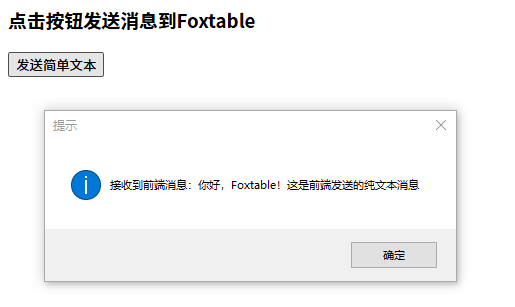
现在打开窗户,在WebViewer显示的页面中单击"发送简单文本",Foxtable就会收到消息:
提示 :WebMessageAsJson属性返回的是消息的JSON格式,所以纯文本也会被包裹在双引号中,如果用TryGetWebMessageAsString获得信息,则文本不会被双引号包裹,例如:
Dim msg As String = e.TryGetWebMessageAsString()
MessageBox.Show("接收到前端消息:" & msg,
"提示",MessageBoxButtons.OK,MessageBoxIcon.Information)