双向通信
本节示例可以参考示例文件"CaseStudy\WebViewer\接收消息.Table"的窗口"双向通信"。
本节示例的任务是实现完整的双向通信:前端发送计算请求,Foxtable接收后计算结果,再通过 ExecuteScriptAsync调用前端函数回传结果。
1、窗口的AfterLoad事件代码:
'''Async
Dim
wv
As
WebViewer = e.Form.Controls("WebViewer1").WebViewer
Await
wv.EnsureCoreWebView2Async(Nothing)
'初始化浏览器
'定义测试页面
Dim
html
As
String
=
<![CDATA[
<!DOCTYPE html>
<html>
<head>
<meta charset="utf-8" />
<title>双向通信-计算示例</title>
</head>
<body>
<h3>发送计算请求到Foxtable</h3>
<p>数字1:<input
type="number" id="num1" value="10" /></p>
<p>数字2:<input
type="number" id="num2" value="20" /></p>
<button onclick="sendCalcRequest()">计算两数之和</button>
<div id="result" style="margin-top:20px; color:red; font-size:18px;"></div>
<script>
//
发送计算请求
function sendCalcRequest() {
const num1 = parseFloat(document.getElementById('num1').value);
const num2 = parseFloat(document.getElementById('num2').value);
//
发送包含计算类型和参数的对象
chrome.webview.postMessage({
type: "add",
param1: num1,
param2: num2
});
}
//
接收Foxtable返回的结果(Foxtable通过调用这个函数返回结果)
function showResult(result) {
document.getElementById('result').innerText = "计算结果:"
+ result;
}
</script>
</body>
</html>]]>.Value
wv.CoreWebView2.NavigateToString(html)
'打开测试页面
2、WebMessageReceived事件代码:
Dim
wv
As
WebViewer = e.Sender.WebViewer
Dim
info
As
JObject = JsonConvert.DeserializeObject(e.WebMessageAsJson)
Dim
type
As
String
= info("type")
Dim
param1
As
Double
= info("param1")
Dim
param2
As
Double
= info("param2")
Dim
result
As
Double
= param1 + param2
wv.ExecuteScriptAsync(cexp("showResult({0})",
result))
'调用前端函数返回计算结果
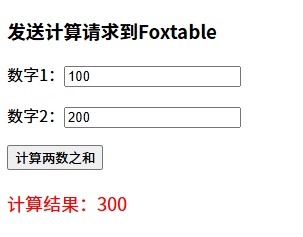
下面是前端页面,可以进行两数求和,不过求和运算是在Foxtable端完成的: