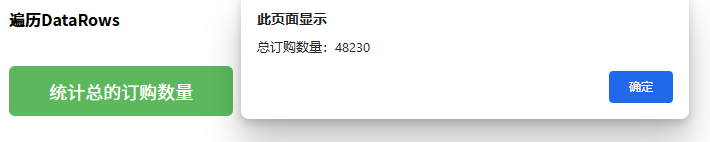
AfterLoad事件代码如下:
关于遍历
Foxtable的所有集合,包括常用的DataTables、DataRows、DataCols、Tables、Rows、Cols等等,并不支持js的原生遍历语法。
所以在前端js代码中,只能用索引形式遍历Foxtable中的各种集合。
示例一
本示例可参考示例文件"CaseStudy\WebViewer\调用Foxtable对象.Table"的窗口"遍历基础"。
假定我们要在前端用js代码通过遍历订单表的所有行来累计总的订购数量:
AfterLoad事件代码如下:
'''Async
Dim
wv
As
WebViewer = e.Form.Controls("WebViewer1").WebViewer
Await
wv.EnsureCoreWebView2Async(Nothing)
'初始化浏览器
wv.CoreWebView2.AddHostObjectToScript("Orders",
DataTables("订单"))
'注入订单表
'定义测试页面
Dim
html
As
String
=<![CDATA[
<!DOCTYPE html>
<html>
<head>
<meta charset="utf-8" />
<title>遍历DataRows</title>
<style>
*{font-size:16px; margin:5px;}
button{padding:12px 40px; font-size:18px; margin:30px 5px;
cursor:pointer;background:#5cb85c;color:#fff;border:none;border-radius:6px;}
</style>
</head>
<body>
<h3>遍历DataRows</h3>
<button onclick="calcTotalQty()">统计总的订购数量</button>
<script>
const Orders =
window.chrome.webview.hostObjects.sync.Orders; //
获得DataTables("订单")
async function calcTotalQty() {
let total = 0;
const dataRows = Orders.DataRows;
//
核心,
先获得DataRows,不要在循环过程中反复获取
const rowCount = dataRows.Count;
//
核心,
先获得总行数
//
通过索引遍历
for(let i = 0; i < rowCount; i++){
const dr = dataRows[i];
const qty = dr["数量"];
total += qty;
}
alert("总订购数量:"
+ total);
}
</script>
</body>
</html>
]]>.Value
wv.NavigateToString(html)
'打开测试页面
注意有红色注释的两行代码,要点就是在遍历开始之前,先获得行集合和总行数,并存储在局部变量中,避免在遍历过程中取反复获取而影响效率,因为每一次获取,就是对Foxtable的一次调用。
示例二
遍历Foxtable中的所有集合类型,包括常用的表、行和列,都应该遵循上述要点。
例如希望通过遍历Rows,将数量超过500订的订单的折扣设置为0.2,AfterLoad事件代码如下:
'''Async
Dim
wv
As
WebViewer = e.Form.Controls("WebViewer1").WebViewer
Await
wv.EnsureCoreWebView2Async(Nothing)
'初始化浏览器
wv.CoreWebView2.AddHostObjectToScript("Orders",
Tables("订单"))
'注入订单表
'定义测试页面
Dim
html
As
String
=
<![CDATA[
<!DOCTYPE html>
<html>
<head>
<meta charset="utf-8" />
<title>遍历DataRows修改折扣</title>
<style>
*{font-size:16px; margin:5px;}
button{padding:12px 40px; font-size:18px; margin:30px 5px;
cursor:pointer;background:#5cb85c;color:#fff;border:none;border-radius:6px;}
</style>
</head>
<body>
<h3>批量设置折扣</h3>
<button onclick="setDiscount()">数量≥500,折扣统一设为0.2</button>
<script>
const Orders = window.chrome.webview.hostObjects.sync.Orders; //
获取Tables("订单")
async function setDiscount() {
let totalUpdate = 0;
const rows = Orders.Rows; //
核心,先获取Rows
const rowCount = rows.Count; //核心,先获取总行数
for(let i = 0; i < rowCount; i++){
const dr = rows[i]; //
获取行
const qty = dr["数量"];
// 获取数量
if(qty >= 500){ //
如果符合条件
dr["折扣"]
= 0.2; // 设置折扣
totalUpdate++;
}
}
//
弹窗提示执行结果
alert(`批量修改完成!共扫描
${rowCount}
行数据,其中
${totalUpdate}
行数量≥500,已设置折扣为0.2`);
}
</script>
</body>
</html>
]]>.Value
wv.NavigateToString(html)
'加载页面
提示:
当然我这里是为了演示遍历的用法,如果你要批量修改,直接在JS调用DataTale的ReplaceFor方法,一行代码即可搞定:
async function
setDiscount(){
Orders.DataTable.ReplaceFor("折扣", 0.2, "[数量] >= 500");
}
示例三
如果你要遍历部分列,可以用js原生的遍历语法了,参考代码:
'''Async
Dim
wv
As
WebViewer = e.Form.Controls("WebViewer1").WebViewer
Await
wv.EnsureCoreWebView2Async(Nothing)
'初始化浏览器
wv.CoreWebView2.AddHostObjectToScript("Orders",
Tables("订单"))
'定义测试页面
Dim
html
As
String
=
<![CDATA[
<!DOCTYPE html>
<html>
<head>
<meta charset="utf-8" />
<title>遍历部分列</title>
<style>
*{font-size:16px; margin:5px;}
button{padding:12px 40px; font-size:18px; margin:30px 5px;
cursor:pointer;background:#5cb85c;color:#fff;border:none;border-radius:6px;}
</style>
</head>
<body>
<button onclick="toggleSpecCols()">遍历部分列</button>
<script>
const Orders = window.chrome.webview.hostObjects.sync.Orders;
async function toggleSpecCols() {
const nms = ["产品",
"折扣",
"数量"];
for(let nm of nms){
const dc = Orders.Cols[nm];
dc.AllowEdit = !dc.AllowEdit;
}
}
</script>
</body>
</html>
]]>.Value
wv.NavigateToString(html)
'加载页面