本节任务是通过网页打开和编辑本地文件:
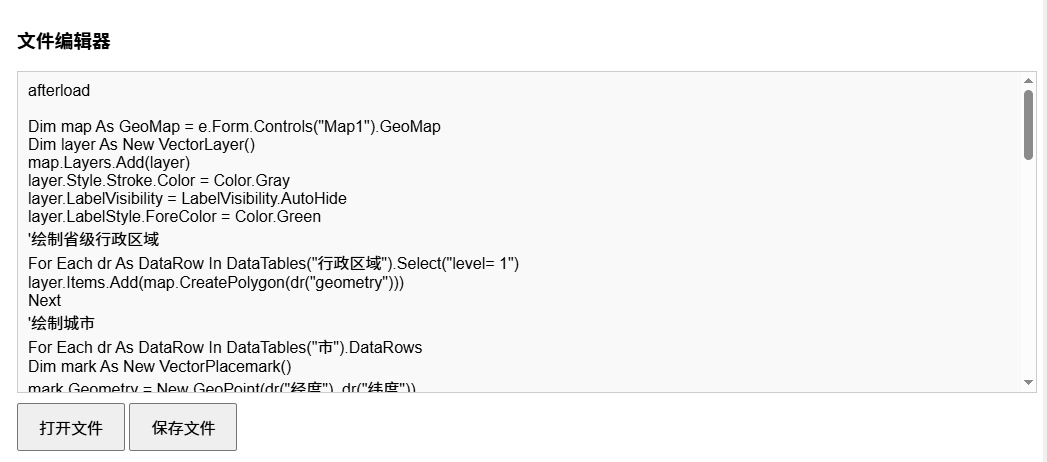
网页是不能读写本地文件的,但是可以通过Foxtable将文件句柄发送到网页,这样网页就可以读写本地文件了。
读写本地文件
本节内容可参考示例文件"CaseStudy\WebViewer\读写文件.Table"
本节任务是通过网页打开和编辑本地文件:
网页是不能读写本地文件的,但是可以通过Foxtable将文件句柄发送到网页,这样网页就可以读写本地文件了。
示例
1、窗口新增加一个按钮,名为btnSendFile,Visible属性设置为False,代码为:
'''Async
Dim
wv
As
WebViewer = e.Form.Controls("WebViewer1").WebViewer
Dim
dlg
As
New
OpenFileDialogA()
dlg.Filter =
"文本文件|*.txt"
dlg.Title =
"选择要发送的
txt 文件"
If
Await
dlg.ShowDialog() = DialogResult.OK
Then
' 1.
创建文件句柄
Dim
env = wv.CoreWebView2.Environment
Dim
fileHandle = env.CreateWebFileSystemFileHandle(
dlg.FileName,
CoreWebView2FileSystemHandlePermission.ReadWrite
)
' 2.
构建JSON消息
Dim
jsonMessage
As
String
=
"{""type"": ""txtFile""}"
' 3.
发送消息和文件句柄到网页
wv.CoreWebView2.PostWebMessageAsJson(
jsonMessage,
New
List(Of
Object)
From
{fileHandle}
)
End
If
前端网页点击"打开文件"按钮,会调用上述代码,上述代码将文件句柄发送到网页,网页收到这个句柄后,即可读写这个文件。
2、窗口的AfterLoad事件代码:
'''Async
Dim
wv
As
WebViewer = e.Form.Controls("WebViewer1").WebViewer
Await
wv.EnsureCoreWebView2Async(Nothing)
Dim
ft
As
New
FoxLib(wv)
'创建Foxtable库
wv.CoreWebView2.AddHostObjectToScript("ft",
ft)
'注入Foxtable库
'
定义测试页面
Dim
html
As
String
=
<![CDATA[
<!DOCTYPE html>
<html>
<head>
<meta charset="utf-8" />
<title>文件测试</title>
<style>
body { font-family: Arial; padding: 20px; }
#editor {
width: 100%;
height: 300px;
border: 1px solid #ccc;
padding: 10px;
overflow: auto;
margin: 10px 0;
background-color: #f9f9f9;
}
button {
padding: 10px 20px;
font-size: 16px;
cursor: pointer;
}
button:disabled {
background-color: #ccc;
cursor: not-allowed;
}
</style>
</head>
<body>
<h3>文件编辑器</h3>
<div id="editor" contenteditable="true">等待接收文件...</div>
<button id="openBtn" onclick="openFile()">打开文件</button>
<button id="saveBtn" onclick="saveFile()" disabled>保存文件</button>
<script>
const ft =
window.chrome.webview.hostObjects.sync.ft;
let currentFileHandle = null;
let currentFileName = '';
// 监听WebViewer的消息事件
chrome.webview.addEventListener('message', async (event) => {
try {
// 1.
验证消息类型
if (event.data.type !== 'txtFile') return;
// 2.
正确获取附加的文件句柄(关键:从event.additionalObjects获取)
if (!event.additionalObjects || event.additionalObjects.length
=== 0) {
alert('未接收到文件句柄');
return;
}
const fileHandle = event.additionalObjects[0];
const file = await fileHandle.getFile();
currentFileName = file.name;
currentFileHandle =
fileHandle;
//
读取并显示文件内容
const text = await file.text();
document.getElementById('editor').innerText = text;
//
启用保存按钮
document.getElementById('saveBtn').disabled = false;
} catch (err) {
alert('处理文件失败:'
+ err.message);
}
});
// 打开文件
function openFile() {
ft.Forms["窗口1"].Controls["btnSendFile"].PerformClick();
}
// 保存文件
async function saveFile() {
if (!currentFileHandle) {
alert('请先选择文件');
return;
}
try {
const content = document.getElementById('editor').innerText;
const writable = await currentFileHandle.createWritable();
await writable.write(content);
await writable.close();
alert('保存成功:'
+ currentFileName);
} catch (err) {
alert('保存失败:'
+ err.message);
}
}
</script>
</body>
</html>
]]>.Value
wv.NavigateToString(html)