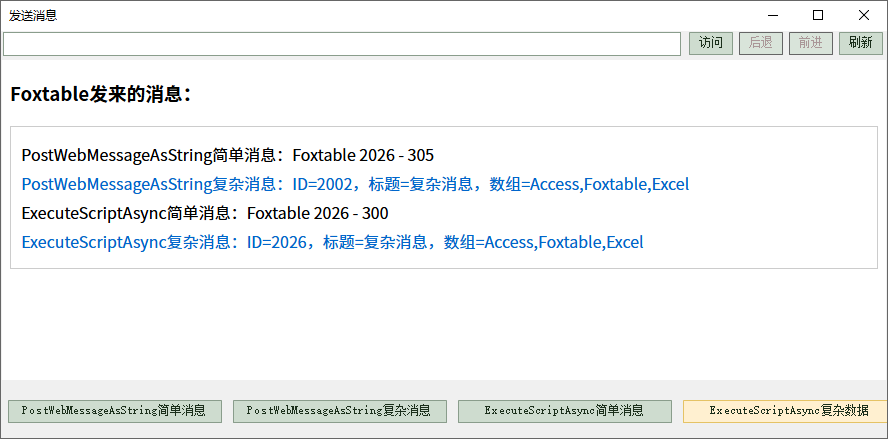
发送文本消息
Foxtable不仅可以接收前端页面发来的消息,也可以主动向前端页面发送消息。
其实之前我们在介绍双向通信时候,已经介绍过ExecuteScriptAsync方法调用前端函数向页面发送消息的办法。
WebViewer有两个方法专门用于向前端页面发送消息的方法,分别是PostWebMessageAsString和PostWebMessageAsJson。
示例
本示例可参考示例文件"CaseStudy\WebViewer\发送消息.Table"的窗口"发送文本消息"。
前端页面要监听WebViewer的message事件,才能接收Foxtable通过PostWebMessageAsString发送的消息:
<script>
window.chrome.webview.addEventListener('message', function(event) {
const msg = event.data; // event.data就是Foxtable发送的文本消息
}
</script>
本节的示例演示无如何PostWebMessageAsString和ExecuteScriptAsync分别发送简单消息和复杂消息:
1、窗口的AfterLoad事件代码:
'''Async
Dim
wv
As
WebViewer = e.Form.Controls("WebViewer1").WebViewer
Await
wv.EnsureCoreWebView2Async(Nothing)
'初始化浏览器
'定义测试页面
Dim
html
As
String
=<![CDATA[
<!DOCTYPE html>
<html lang="zh-CN">
<head>
<meta charset="UTF-8">
<title>发送消息</title>
<style>
#msgContainer { margin: 20px 0; padding: 10px; border: 1px solid #ccc; }
</style>
</head>
<body>
<h3>Foxtable发来的消息:</h3>
<div id="msgContainer"></div>
<script>
//
核心:监听WebViewer的message事件,接收Foxtable通过PostWebMessageAsString发来的消息
window.chrome.webview.addEventListener('message', function(event) {
const msg = event.data; // event.data就是Foxtable发来的字符串
const container = document.getElementById('msgContainer');
try {
//
尝试解析为JSON(处理复杂数据)
const jsonData = JSON.parse(msg);
container.innerHTML += `
<div style="margin: 5px 0; color: #0066cc;">
PostWebMessageAsString复杂消息:ID=${jsonData.Id},标题=${jsonData.Title},数组=${jsonData.Items?.join(',')
|| '无'}
</div>
`;
} catch (e) {
//
解析失败则作为普通字符串处理
container.innerHTML += `<div style="margin: 5px
0;">PostWebMessageAsString简单消息:${msg}</div>`;
}
});
//接收Foxtable通过ExecuteScriptAsync发送的简单文本消息
function receiveScriptSimpleMsg(message) {
const container = document.getElementById('msgContainer');
container.innerHTML += `<div style="margin: 5px
0;">ExecuteScriptAsync简单消息:${message}</div>`;
}
// 接收Foxtalbe通过ExecuteScriptAsync发送的复杂JSON消息
function receiveScriptComplexMsg(data) {
const container = document.getElementById('msgContainer');
container.innerHTML += `
<div style="margin: 5px 0; color: #0066cc;">
ExecuteScriptAsync复杂消息:ID=${data.Id},标题=${data.Content},数组=${data.Items?.join(',')
|| '无'}
</div>
`;
}
</script>
</body>
</html>
]]>.Value
wv.CoreWebView2.NavigateToString(html)
'打开测试页面
2、四个发送按钮的代码分别为:
| 按钮 | 代码 |
|---|---|
| PostWebMessageAsString简单消息 |
Dim
wv
As
WebViewer = e.Form.Controls("WebViewer1").WebViewer |
| PostWebMessageAsString复杂消息 |
Dim
wv
As
WebViewer = e.Form.Controls("WebViewer1").WebViewer |
| ExecuteScriptAsync简单消息 |
'''Async |
| ExecuteScriptAsync复杂数据 |
'''Async |
重要提示:
如果要发送的文本内容包括特殊符号或转义符,那么用ExecuteScriptAsync发送可能会失败,例如:
'''Async
Dim
wv
As
WebViewer = e.Form.Controls("WebViewer1").WebViewer
Dim
msg
As
String
=
"Fox\ntable ""2026"" - "
&
Date.Now.Millisecond
Await
wv.ExecuteScriptAsync("receiveScriptSimpleMsg("""
& msg &
""")")
前端将收不到上述消息,文本中包括了特殊符号(双引号),以及转义符号"\n",如果你去掉双引号,前端可以收到消息,但是看不到\n,因为\n在js字符串中是换行的意思。
正确的代码是:
'''Async
Dim
wv
As
WebViewer = e.Form.Controls("WebViewer1").WebViewer
Dim
msg
As
String
=
"Fox\ntable ""2026"" - "
&
Date.Now.Millisecond
msg = JsonConvert.ToString(msg)
'用JsonConvert进行转换
Await
wv.ExecuteScriptAsync("receiveScriptSimpleMsg("
& msg &
")")
'注意不需拼接双引号了,直接发送即可。
建议大家用ExecuteScriptAsync发送普通文本信息
时,统一先用JsonConvert转换一下,确保万无一失。